
Volume 68 | July 17, 2026
This Week’s Featured Media, Articles, & Breaking News
🎙 Secured Podcast
|
Episode 24 | Access Control Hit CNBC — And VTS Made the Industry's Biggest Reversal ✍🏻 Articles
|
Podcast | Secured: Episode 24
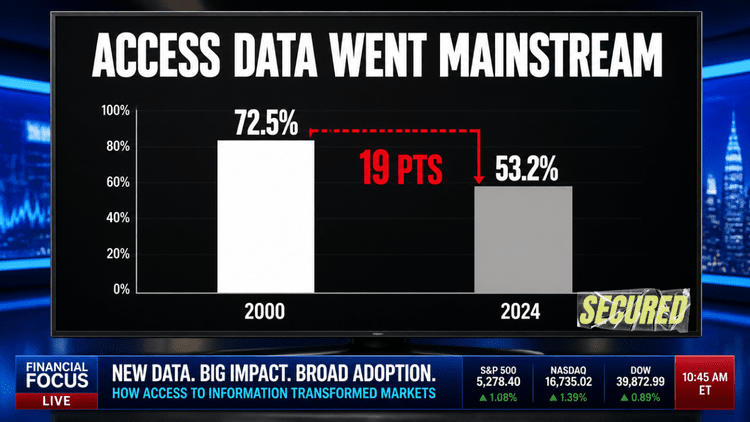
VTS covers over 60% of Class A office space in the US, and after building access control in-house, they just reversed course and partnered with SwiftConnect instead. Lee digs into what that says about where the real value sits in this industry. Then: access control data goes mainstream when Kastle Systems appears on CNBC to talk occupancy data across 3,500 buildings.
According to HiveWatch's 2026 report, large enterprises report false alarm rates nearing 44%. With false alarm rates that high, your team spends nearly half its time chasing noise, and most organizations cannot state their actual number when asked. So how does an organization stop
the alarm fatigue inevitably caused by that many false alarms? The answer isn’t to slap an AI system on top in the hopes it will fix the problem. The answer is to build out a strategic alarm architecture. The creation and maintenance of an effective alarm architecture will drastically decrease the false alarm rate, increase situational awareness, and effectively determine which investments are worth making to improve your system.
Define What You Want to See and Where
The first issue that needs resolution is what you care about and where you care about it. If you alarm on motion everywhere, your operators will never notice the loitering event amidst all the noise. So get specific about which alerts matter and where. Do you care about loitering outside a secure perimeter, or only near restricted zones? Are there employee-only areas where every entry should register? Sit down with your team and spell out all the alerts that you want to see.
This is a great time to bring in a 3rd party and conduct a threat/risk assessment if there is budget for it. An outside perspective can help identify threats and risks that your team might miss.
It is important at this stage to focus on what you need, and not to get bogged down with current capabilities. That comes later.
Don't Confuse Actionable Items with Observational Ones
A gun is detected on property, and the system notifies your operator. Does that show up on the same screen as the front door opening? A system should categorize your alerts into two buckets: events (things you want to know about) and alarms (things your operators must act on). That single distinction significantly decreases the alarm fatigue experienced by your team. Awareness-only notifications do not belong on the screen that displays emergencies.
Spoiler for later: it’s not unlikely that the events list will shrink, if not disappear, as you validate the new architecture later on. That’s ok. The bifurcation at this stage helps to ensure things aren’t missed.
Determine the Capability Gap
After defining what you care about, and splitting everything into two buckets, it's time to review your current capabilities. Categorize all events and alarms by what is achievable with your current system, what is partially achievable, and what isn't possible. Now review what upgrades to hardware and/or software can help you close the gap within your budget.
If you are interested in an AI platform to augment your current system, this is where you can see which gaps it would cover.
Validate Validate Validate
The key to any effective system is robust testing. Once you have defined the basic structure of the Alarm Architecture, put it to the test! Build a mock environment, or use an existing site, and route alarms and events to test users only. Have the team that built the architecture take turns
running 2-hour shifts and take notes. This step will save a lot of tweaking once an architecture is implemented in production.
One key piece to embrace during the validation phase is iteration. The architecture can and should be tweaked with more test shifts run to reach the final schema that satisfies the needs of the organization. This iteration may also lead to items moving from the Events column to the Alarm column and vice versa. You may even decide (as one of my customers did) that an event bucket isn’t needed after all. There is no one-size-fits-all here. Make the architecture yours.
Do Your Operators Know What to Do for Each Specific Alarm?
An alarm is useless if the operator who receives it doesn't know how to respond. This is where ongoing maintenance of your Alarm Architecture is critical. Operators will require both initial training and ongoing testing to ensure the proper procedures are followed. One way to streamline this: build the guidance into the system so an alarm automatically opens an incident with the response spelled out.
Results
Completing the process above and developing your own unique alarm architecture will ensure that your false alarm rate drops and you know the key things taking place at your organization. You know what you are watching for and where, and you can measure against it. If you have technology gaps, justifying additional expenditure becomes easy as you can point to the exact
threat or vulnerability the upgrade addresses. Situational awareness goes up, fatigue goes down, and your operators stop ignoring the screen on the assumption it is all noise.
What was your experience like the last time you approached an opening with access control? It probably doesn't stand out as memorable. With your credential in hand, you presented it to the reader. Beep, click, unlock, enter. No real thinking required, just like brushing your teeth.
But, can you remember how the door unlocked? Upon a valid read, the access control system activated its lock output to unlock the door. In a great number of openings, the device that access control system unlocked is the electric strike. This is one of the most basic functions of an access control system.
But, if you had the opportunity, what would you change about your experience?
On a great number of access controlled doors, we often see a reader with an electric strike. On the door hardware side we also usually see either a door pull or a storeroom function lockset. What exactly is a storeroom function? a storeroom function lockset is when the outside lever is always fixed or rigid and cannot be rotated. A Key is required for entry and the inside lever is always free rotating (unlock what's shown in the movies, you cannot get locked in a storeroom!). Historically, these locks were specified on a storage room or closet, and that makes sense. You could use your key to unlock the door, gather the supplies you need, close the door behind you, and not worry whether you remembered to lock it.
Now, place that same function on an access controlled opening. When you unlock the electric strike with your credential, you reach for the door lever and push or pull the door to open it. (remembering that the lever is fixed and cannot move). Would you call this user-friendly? Not really. I've heard of situations where a user unlocks the door, puts their hand on the outside lever, and still thinks the door is locked. They didn't realize they had to push or pull the door open, so they walk away and either give up or go get help.
You can imagine this scenario being played out at the opening below:
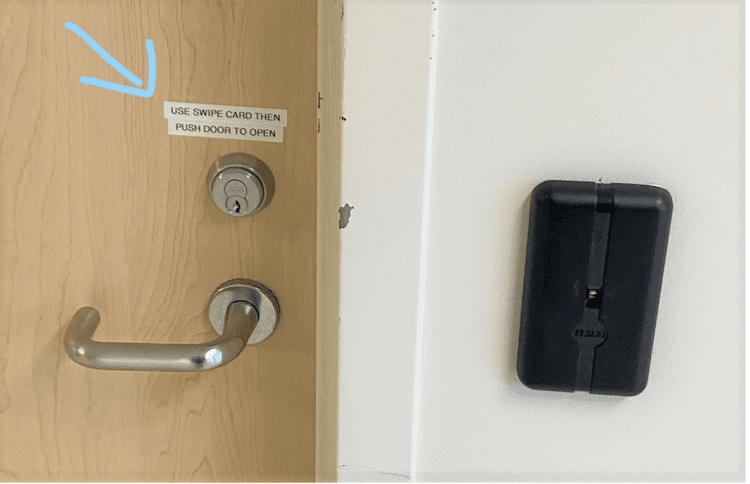
In this picture shown above, an electrified mortise lock would be a much better solution. When a user presents their credential at the reader, the lock unlocks the outside lever, allowing one to grasp it and turn it to retract the latch and open the door. No special knowledge required. No instructions posted on the door to guide the user.
Benefits of an Electric Lock:
-
Better opening aesthetics - device and wiring is concealed within the door through a pre-prepped wire raceway. No preparation required on the strike jamb of the door frame, creating a better looking and more secure opening.
-
No chance of pre-load on the electric strike - a situation where, because of misalignment from the door or lock, pressure is exerted on the strike gate, preventing it from unlocking when it's supposed to.
-
Less noise and moving parts - when unlocking the door, you will barely hear the lock actuate as the solenoid is concealed within the lock body.
-
Added Bonus of a built in request to exit switch that activates upon turning the inside lever. No need for a separate request to exit motion sensor installed above the inside of the opening to shunt the door contact.
-
More functions available - electric locks now have the ability to retract the latch and also unlock the outside lever. This works perfectly for when you have an automatic operator on the door and need the latch to retract when someone presses a wall switch to open the door and also still need the outside lever to unlock separately.
But why don't we see more electric locks on doors?
Here are the main reasons:
-
Cost - electric locks are generally more expensive than electric strikes and require an electric hinge or current transfer device
-
Complexity of installation and door preparation - the door needs a wire raceway prepared before installation and the lock should be pre-wired to ease installation
-
Availability - these locks are typically only available to the door hardware distributor or supply firm. The security integrator typically only has access to electric strikes and is relegated to only using them
-
Lack of knowledge - electric locks are not as popular as electric strikes
It is understood though that sometimes you can't avoid specifying or using an electric strike, depending on the circumstances and/or application. In a lot of scenarios, an electric strike may be the better choice. But, if you take the time to think about how we can make the user experience better on openings, I think you will agree that an electric lock is an excellent option, based on what we just discussed. You will be providing a much better experience and your opening will look and function better too.
👀 As Seen in the PhySec Community this Week:
#acs26
#job-board
-
Anthony Kowalik shared
We're hiring a sales engineer at Wavelynx. Definitely looking for someone with access control experience (shouldn't be an issue with this group ). The role is a hybrid one, based out of our office in Broomfield, CO. -
Matt Graham shared
Hey everyone, the CTO of one of our client companies is looking for his next opportunity. We worked closely with Jonathan, and I can confidently say he’s a strong leader.
#marketing-communications
-
Lee Odess shared
We are highlighting security mainstream stories. Seem to be resonating. Here’s another
#shameless-plugs
-
Jon Polly shared
Some of you know I host a Wine and Security event at ISC West. If you are going to GSX, we have had enough interest to host it there as well. We have spots still available for sponsorship.

ACS26, The Access Control Summit, is heading to New Zealand in 2026 October 6 & 7th, hosted in collaboration with our city-host, Gallagher Security. Registration is OPEN NOW! Sign up here.
Speaking at the event? Go here.
Want to view some testimonials from previous years? Go here.

Secured Presents: XPod from The Security Event
We asked everyone the same four questions. What came back was not a recap. It was a read on where the industry actually is, told through the people doing the work.
All stories:
Intro: What We heard at TSE
Episode 1: Identity Is The Center, Hardware Is The Floor.
Episode 2: Regulation Is Not the Tax. It Is the Moat.
Episode 3 — The Mainstream Moment Is Real, But It Is Not Singular.
You can stream directly from our Secured channel.

West to East series: We're looking back on 45 conversations with leaders from across the industry. Each episode offers a different perspective on the ideas, challenges, and opportunities shaping security today. You can stream all episodes right from our Secured channel.
🗣️ Your Voice Matters.
Share your feedback, suggest topics, and tell us what questions we should be answering. Help us shape future issues and contribute to the conversations that move the industry forward.
